A free plugin for Roblox Studio · v2.1.1
Any 3D model.
Playable in seconds.
Drop in a character from an AI generator or your 3D app. InstaSpawn slices it, rigs it, places every attachment and fits its clothing cages, and you have a Roblox character ready to play.
$9.99/month · cancel anytime
Works with low poly models from

 Rodin
Rodin- Hunyuan3D


- and others
Opens .fbx, .glb, .gltf and .obj files, with their textures.
- parts, cut and rigged
- 15
- parts, cut and rigged
- attachment points
- 18
- attachment points
- clothing cages
- 15
- clothing cages
From a prompt to a player.
You set the joints; the rest happens on its own. Then change anything you like.
Two pipelines. Pick the one that fits your character.

Pipeline 1
Already clothed
The clothes and armor are part of the model, as with most AI-generated characters.
See how it goes ↓
Pipeline 2

Unclothed
A bare body, made ready for layered clothing, armor and gear. One model becomes a whole cast.
See how it goes ↓
Pipeline 1 · outfit built in
Already clothed
Your concept, playable in seconds.
Sketch or generate your concept art, turn it into a model in your AI 3D generator, and bring that character to life in Roblox with its outfit and armor intact. You choose exactly where every joint goes, so it bends where it should. The result is cleaner than an auto-rigger's, in less time.
 01Import
Drop in the model with its clothes on.
 02Drag the points
Drag a point onto each joint. The cut follows it.
 03Play
A skinned R15 character, ready to walk.
Pipeline 2 · ready for clothing
Unclothed
One body. A whole cast.
Import any character body once and set a ring at each joint. Smart loop detection intelligently finds the mesh's own edge loops and cuts along them, which keeps the joints clean and the poly count down. Rigging, attachments and the cages for layered clothing are automatic, and in seconds the body is ready for clothing, armor and gear, including anything from the Roblox Marketplace.
 01Slicing
Set a ring at each joint. Smart loop detection detects the mesh's own edge loops, reducing poly count.
 02Joints
Ball joints at every cut, so the parts bend cleanly.
 03Auto-rig
Rigged automatically: skinned, every joint placed, test walk included.
 04Attachments
All 18 attachment points, for hats, weapons and packs.
 05Cages
Eye and mouth markers set, then clothing cages fitted to the body.
 06Clothing
Ready to wear: layered clothing and armor fit over the body and its gear.
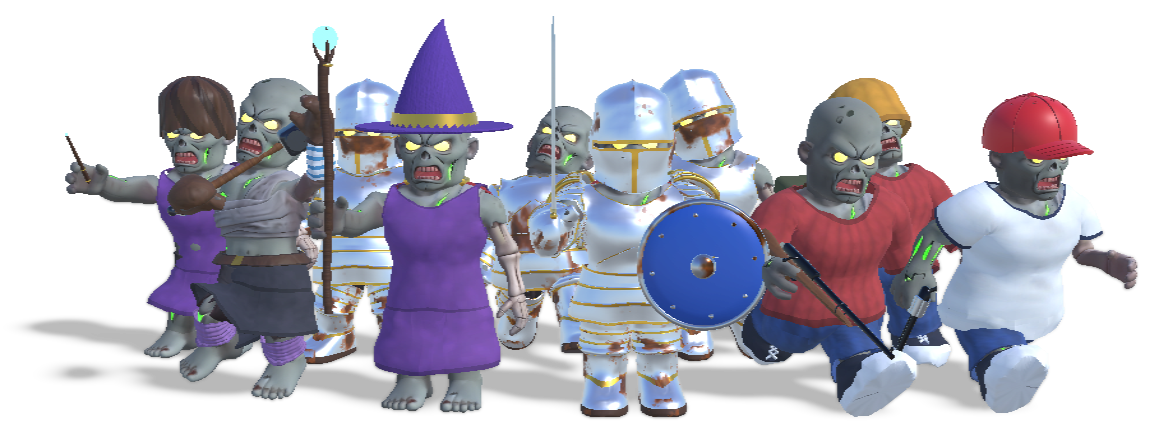
From one body, the horde is spawned.
The same body, dressed ten ways. That's a modular character system from a single import.
The hard parts are already done.
Rigged, joint by joint
Set a point or ring at each joint, and your model is cut cleanly there into the 15 parts Roblox expects. Then it's rigged as rigid parts or as one skinned mesh with painted weights, so it animates like any Roblox character.
- -Smart loop detection: cuts along your model's own edge loops, keeping the triangle count down
- -Rigid or skinned
- -A test animation to see it move
Every attachment, placed
Hats sit on the head, tools in the hand, backpacks on the back. All 18 attachment points are placed from your character's own shape. Move or turn any of them right in the view.
- -Try hats, weapons and gear on in the preview
- -Fine-tune with handles or typed values
Ready for layered clothing
Every part gets a fitted clothing cage, so layered clothing from the Marketplace wraps your character the way it wraps Roblox's own bodies. If skin shows through a shirt, adjust the cage there and the clothing sits clear of it.
- -Adjust the cages for the whole body or one part at a time
- -Try test clothing and armor on before you export
Your next character is seconds away.
Simple slicing and a rigid rig are free for good. Pro adds precise cuts, skinned rigs, attachments and clothing cages.